
Vibe Coding: Checkpoint 1
While you are reading, listen to the song "Floating on Syntax"
Checkpoint 1
Learning a new language is tough, but practice makes perfect. As an beginner practicing Latin American Spanish, I set out to build a custom language tutor app tailored to my specific learning goals—focusing on conversational listening comprehension for TV shows and films.
Today marks a major milestone in the development of my Spanish Tutor App: Checkpoint 1 is officially complete.
See my first post about vibe coding for background.
I established the core architecture, authenticated cloud integrations, and deployed the foundational application live to Streamlit Community Cloud. Here is a look under the hood at how the pipeline works, the stack I chose, and what it took to get this first checkpoint live.
Try it Out
If you would like to try it out, visit the spanish tutor (if you don't feel comfortable clicking the link, enter https:/spanish-tutor.streamlit.app)
If it says the app is asleep, just click the button to wake it up!
Development Workflow
Before adding complex UI elements or spaced-repetition logic, I wanted to verify that my local code on macOS could sync seamlessly to GitHub, auto-deploy on Streamlit Cloud, and communicate securely with Firebase Cloud Firestore and the Gemini API.
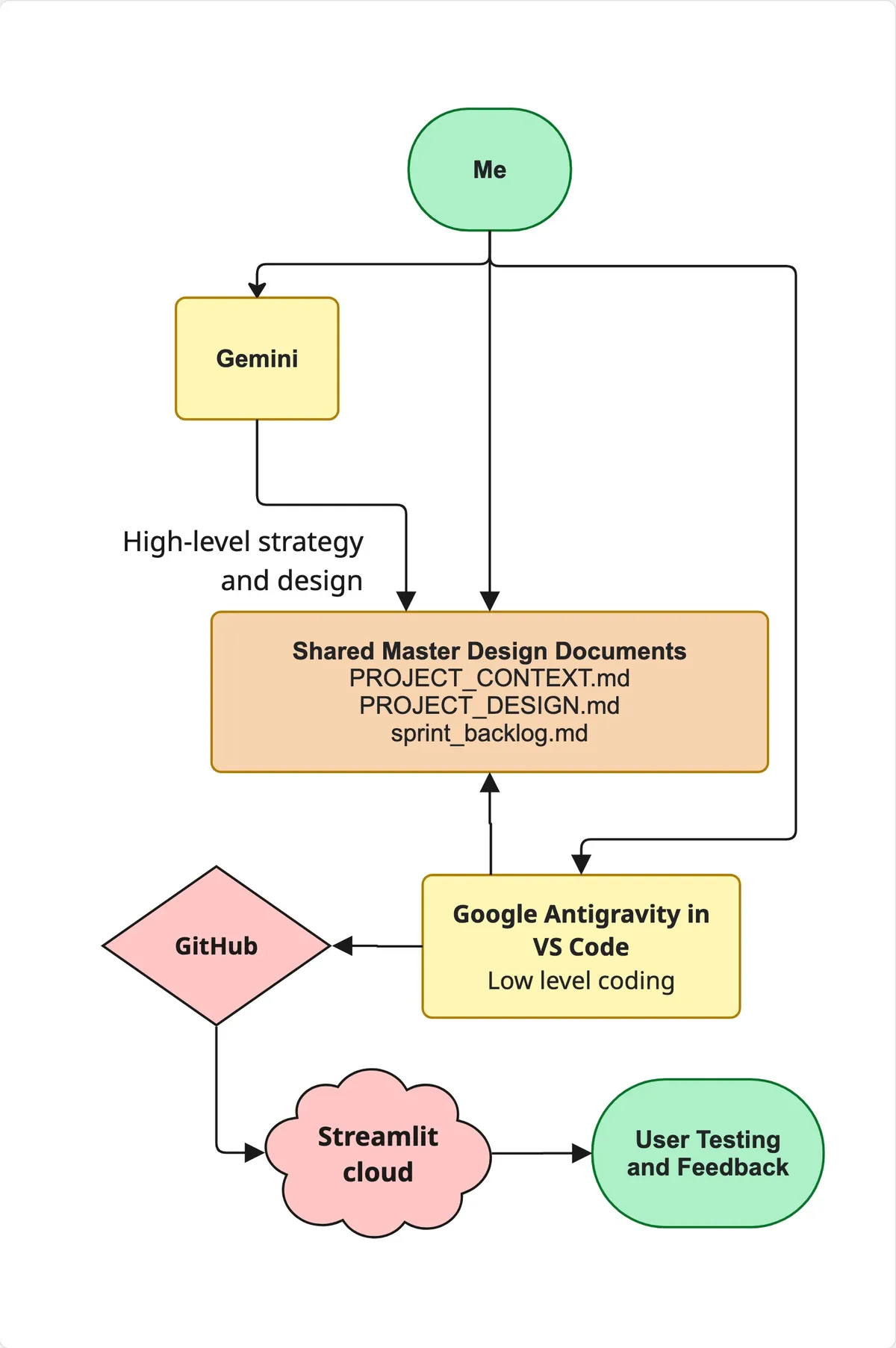
I worked with Google Gemini to brainstorm, strategize, and design. THe output of this processes is three documents, the project context, the design, and a sprint backlog of checkpoints and tasks.
On the other side, I worked in Visual Studio Code with Google Antigravity, which takes care of the application coding and pushing code to a GitHub repository. Antigravity uses the three documents to write the code according to the design and backlog.
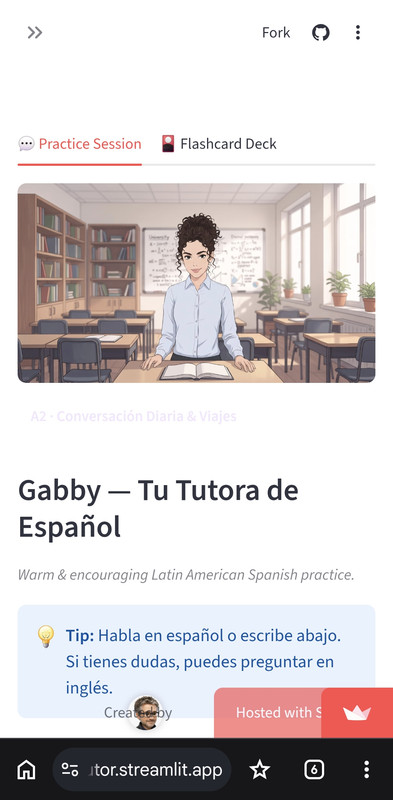
The App
Gabby takes a warm, encouraging approach to conversational Spanish. As you speak through the push-to-talk microphone, she listens for subtle grammar slips and offers gentle inline feedback.
During your conversation, if you struggle with specific vocabulary, Gemini automatically appends a hidden tag to save the word straight into your Cloud Firestore flashcard deck.
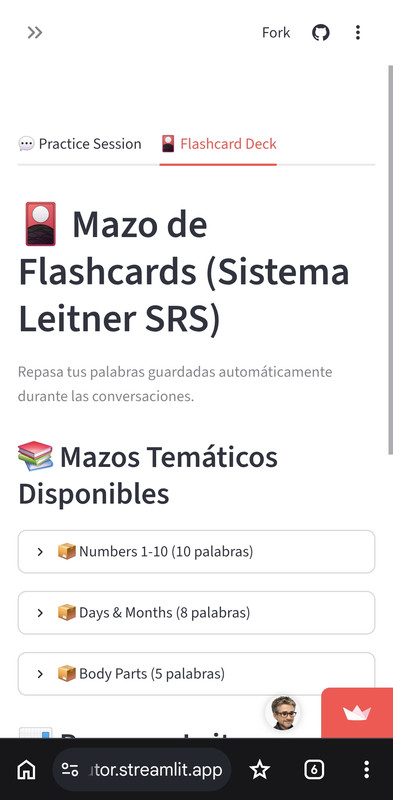
The flash card tab shows a list of flash cards, that for now are pre-loaded decks like number and body parts.
The Tech Stack
UI Framework: Streamlit (tutor.py) — Provides a single-file, responsive web dashboard that builds native browser widgets directly from pure Python.
LLM Engine: google-genai SDK querying Gemini 3.7 Flash — Delivers rapid, low-latency responses for natural conversational exchanges.
Database & Cloud State: Firebase Cloud Firestore (google-cloud-firestore) — Handles NoSQL cloud persistence for vocabulary words (words/), chat sessions (chat_sessions/), and app settings.
Secrets Management: Dual-mode resolution using st.secre
Key Challenges Solved in Checkpoint 1
- Secrets & Credentials Handling
Exposing service keys or LLM API tokens on public GitHub repositories: In Checkpoint 1, I established strict environment isolation:
Local .env and firebase-key.json files are locked down via .gitignore.
tutor.py uses a resilient fallback block to load Firebase credentials: it reads local JSON credentials when running on my Mac and dynamically parses st.secrets when executing on Streamlit Cloud.
- Securing Firebase Cloud Firestore
- Firestore default test-mode rules expire after 30 days. Since my Streamlit application connects using administrative service account credentials (firebase-key.json), I locked down public client access completely:
rules_version = '2';
service cloud.firestore {
  match /databases/{database}/documents {
    match /{document=**} {
      allow read, write: if false; // Denies unauthenticated public access; backend SDK bypasses rule safely
    }
  }
}
This ensures malicious actors cannot tamper with my Firestore collections, while my backend Python app maintains full read/write access.
Checkpoint 2
With Checkpoint 1 complete and deployed, I am shifting focus directly to Checkpoint 2: Minimum Viable Product (MVP).
Here is the actual sprint backlog we are working on for checkpoint 2
# 🎯 [ ] CHECKPOINT 2: The MVP (Minimum Viable Product)
**Goal:** Deliver the core value proposition—talking to Gabby and saving words to a spaced repetition deck—using the UI design.

* [x] Create `config.yaml` to store `personas` (Gabby/Mateo) and `preset_decks` starter datasets[cite: 10, 11].
* [ ] Build Tab 1 ("💬 Practice") with the compact 16:9 tutor banner (`st.columns`), avatar chat feed, and `st.audio_input` push-to-talk widget[cite: 9, 10, 11].
* [ ] Integrate Gemini 3.7 Flash API to process raw audio bytes/text and return conversational Spanish responses[cite: 9, 11].
* [ ] Implement automated vocabulary capture: parse `[SAVE: spanish_word]` tags via regex and upsert to Firestore `words/` subcollection[cite: 9, 11].
* [ ] Add inline spoken tutor TTS audio playback (🔊 Play Audio) and translation toggle (🈳 Translate) to chat bubbles[cite: 9, 10].
* [ ] Build Tab 2 ("🎴 Flashcards") with basic Leitner Box logic, filtering words due today (`next_review <= today`), and response controls ([Got It], [Wrong], [Pass])[cite: 9, 11].

---
The Code
If you would like to check out the code and documentation, the code is in GitHub, check out https://github.com/azdrew/spanish-tutor